



Are you looking for a simple way to buy airtime online without hassles? Here’s a guide that clearly explains the easiest method in which you can recharge airtime across any network without stress.
Gone are those days when buying airtime in Nigeria depended solely on physical recharge cards or waiting for bank networks to be stable. Now you can instantly buy airtime online to any network within just a few minutes.
One platform that has made the whole process smooth is AirtimeFlip. It offers quick, simple, and secure ways to buy airtime online without any delays. Even if you recharged excess airtime, its airtime to cash feature ensures you’ll get your money back.
Contents
Why AirtimeFlip Is the Best Option for Buying Airtime Online
Unlike the usual process, AirtimeFlip provides a cleaner and easier experience for airtime recharge. It works smoothly, and you can recharge networks like MTN, Airtel, Glo, and T2 (formerly 9mobile). The platform supports fast payments, instant delivery and a simple interface that anyone can use.
In addition, AirtimeFlip’s availability on the website and mobile apps makes it a great choice for quick airtime recharge online. You can recharge both physical SIMs and eSIMs within a few minutes.
Requirements to Buy Airtime on AirtimeFlip
To ensure a smooth airtime charge on AirtimeFlip, you’ll need to have the following.
- An AirtimeFlip account.
- The number you want to recharge to.
- A payment method (credit or debit card, bank transfer or AirtimeFlip wallet balance).
Steps:
Buying airtime online is easy with AirtimeFlip, and to get started, here are a few steps to follow:
Step 1: Login or Create an AirtimeFlip Account
If you already have an AirtimeFlip account, you can log in. New users should do the following.
- Go to the AirtimeFlip website or use the mobile app (Play Store and App Store).
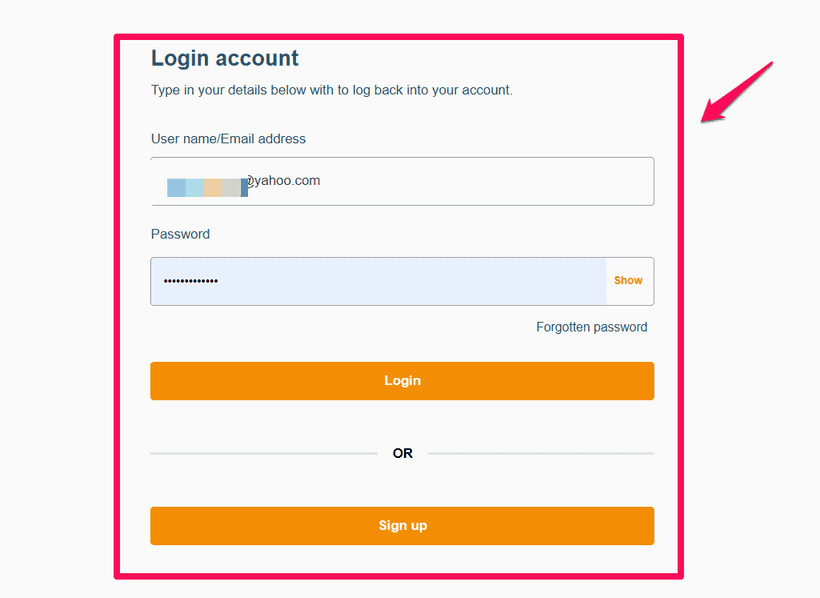
- Tap on Sign Up, then fill in all the required details.
- Click on the Next button and wait while an OTP code is sent to your email. Verify the OTP and log in to your AirtimeFlip account once done.
- Complete your AirtimeFlip account by creating a transaction PIN. Then link your BVN and NIN for full account verification.
- Fund your AirtimeFlip account wallet. Click on Fund Wallet. You can fund with a bank or fund via debit or credit card.
Step 2: Purchase Airtime Using AirtimeFlip
With your account ready and successfully logged in, here’s what to do.
- In your AirtimeFlip account dashboard, navigate to Airtime Purchase.
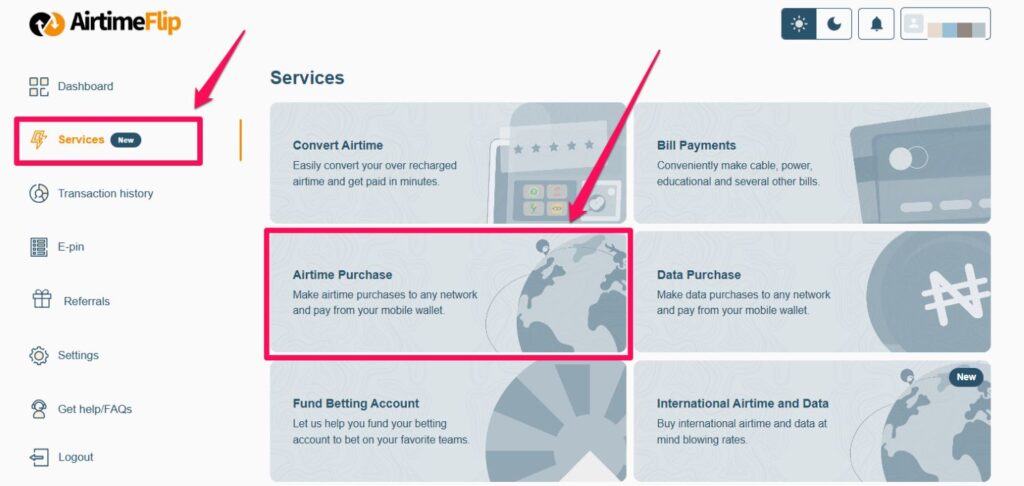
- Choose the Network Provider you want to top-up.
- Enter the Phone Number (double-check to verify that the beneficiary number is correct).
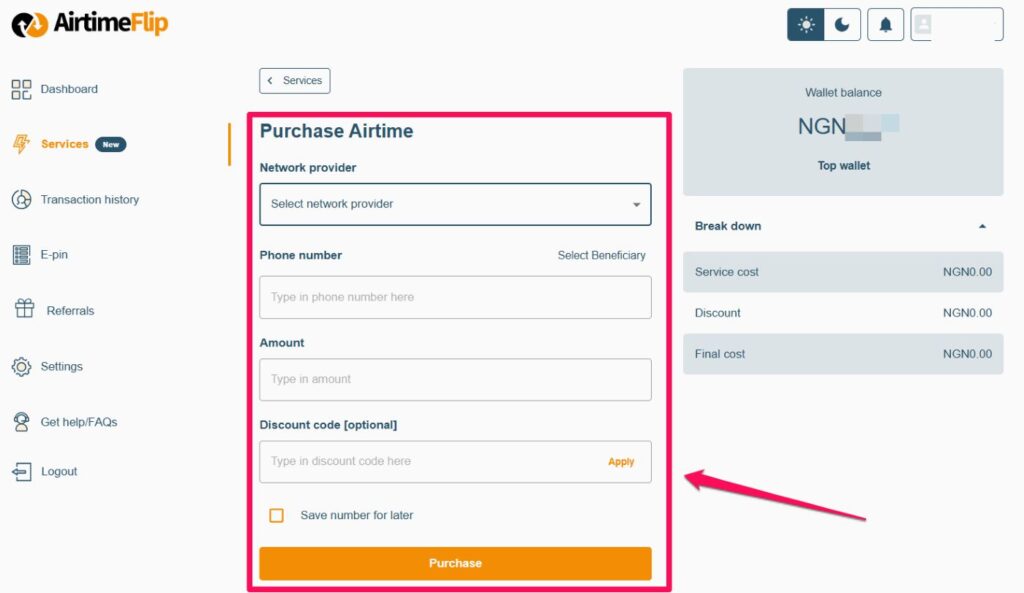
- Enter the amount you want to recharge in the Amount tab, then enter your Discount Code (this is optional).
- Verify the service cost and final cost from the breakdown section. Then click on Purchase to make payment.
- Enter and confirm your 4-digit security PIN on the pop-up panel that appears.
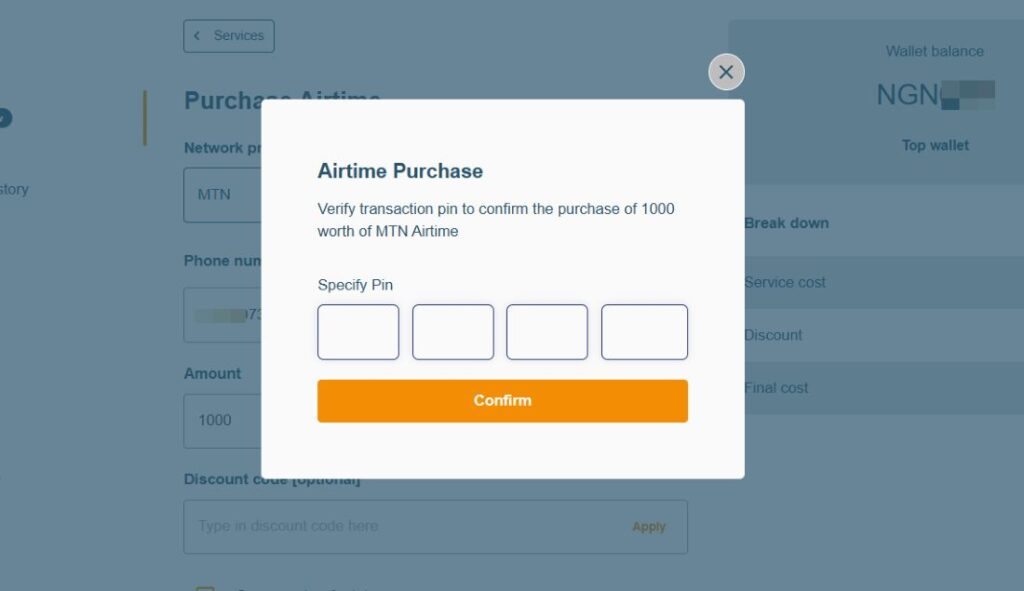
- After a successful transaction, your Wallet Balance will be deducted and you should receive the airtime.
Step 3: Confirm Airtime Top-Up
Check your phone or confirm from the beneficiary’s phone number if there’s an airtime top-up notification. If there’s none, kindly wait a few minutes, and the recharge should reflect right away.
Supported Networks & Minimum Recharge Amount
| Network | Supported on AirtimeFlip? | Minimum Recharge Amount |
| MTN | Yes | ₦100 |
| Airtel | Yes | ₦100 |
| Glo | Yes | ₦100 |
| T2 (9mobile) | Yes | ₦100 |
FAQs:
Can I buy airtime for another person’s number?
- Yes, you can recharge any Nigerian phone number directly on AirtimeFlip, even if it belongs to someone else.
Is AirtimeFlip available 24/7?
- AirtimeFlip’s services are accessible anytime you need them with little to no downtime.
How fast will the airtime arrive?
- Purchased airtime is delivered instantly once your wallet payment has been confirmed.
Which networks can I recharge on AirtimeFlip?
- You can buy airtime for MTN, Airtel, Glo and T2 (formerly 9Mobile).
What happens if my payment is debited but the airtime doesn’t show up?
- For this, you’ll need to be patient and also check your transaction history to confirm completion or reversal.
Conclusion
Making airtime recharge online has been made easier for millions of Nigerians. With AirtimeFlip, it even gets better and safer. Now you can top up both personal numbers or any other beneficiaries of your choice without any issues.