


Have you ever wondered how to send airtime from one network to another in Nigeria? Maybe you have airtime on your preferred line but want to share some with a friend using MTN, Glo, Airtel, or T2mobile (formerly 9mobile).
Here’s the truth. Unfortunately, you can’t transfer airtime directly across networks in Nigeria. Each telecommunication provider only allows airtime transfers within its own network and not outside it. For instance, users of MTN can only send airtime to other MTN numbers, Airtel users can only send to Airtel lines, while Glo and T2mobile networks work the same way.
If you try to send airtime from MTN to Airtel or from Glo to T2mobile, the transfer won’t go through, just because inter-airtime transfer just doesn’t work. However, there’s a simple solution. You can use a third-party platform like AirtimeFlip to send airtime between different networks without stress. In this post, you’ll learn exactly how it works.
Before we get started, let’s understand airtime transfer in Nigeria and how it works.
Contents
Understanding Airtime Transfers in Nigeria
Each mobile network in Nigeria has its own unique airtime sharing feature. They all have different names such as MTN Share (formerly Share ‘N’ Sell) on MTN, Me2U on Airtel, EasyShare on Glo, and Airtime Transfer on T2mobile.
To Share Airtime in Nigeria Using USSD:
- MTN Share: Dial *321*Recipient’s Number*Amount*PIN#
- Airtel Me2U: Dial *321# to start and navigate to Airtel to Airtel, then follow the prompt to complete the transfer.
- Glo EasyShare: Dial *131*Recipient’s Number*Amount*PIN#
- T2mobile Airtime Transfer: Dial *321# then follow the prompt to complete the airtime share.
These network features make it very easy to send airtime to another user, but they only work within the same network. That means you can send airtime from one MTN user to another MTN user, but not from MTN to Airtel or any other network.
This is where AirtimeFlip becomes useful. It allows you to send airtime from one network to another easily by first converting your airtime to cash.
How to Transfer Airtime from One Network to Another Using AirtimeFlip
AirtimeFlip is a trusted platform that helps you convert airtime to cash, buy airtime or data, pay bills, and even send airtime to users on different networks. Since direct airtime transfers between different networks in Nigeria are impossible, AirtimeFlip gives you a simple way to get it done seamlessly.
To transfer airtime from one network to another using AirtimeFlip, follow these steps below.
Step 1: Visit AirtimeFlip.com
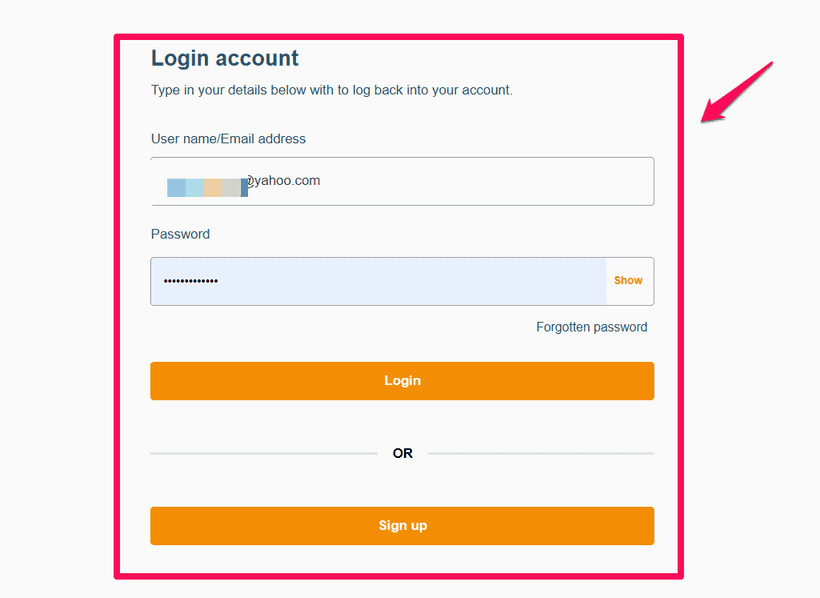
Go to AirtimeFlip.com using your preferred browser or simply install the AirtimeFlip app on App Store or Play Store. If you are a new user, you need to create an account. Existing users can simply sign in and proceed to the next step.
Step 2: Convert Airtime to Cash
After signing in, click on “Convert Airtime to Cash.” Choose your network, whether MTN, Glo, Airtel, or T2mobile, and you can then enter the amount of airtime you want to send. Follow the on-screen instructions to transfer the airtime to the number provided by AirtimeFlip.
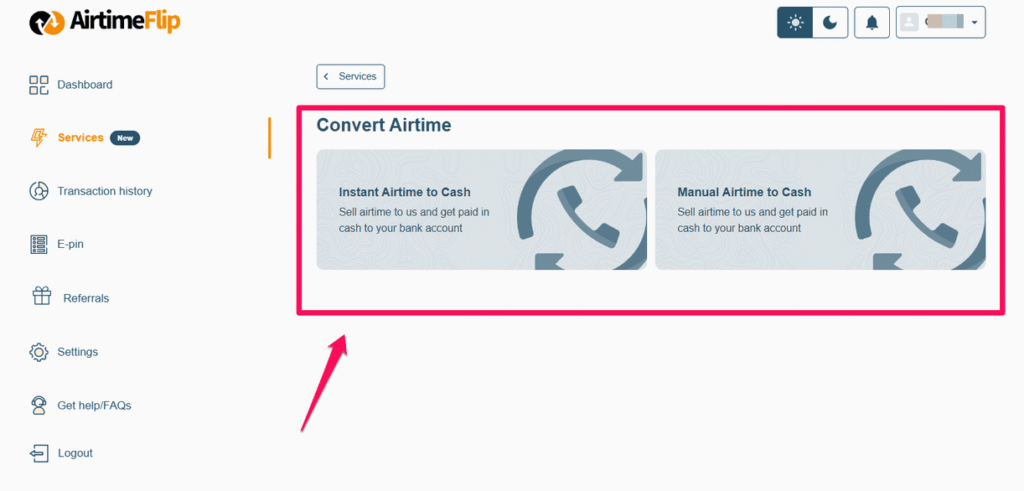
Once the airtime is received and verified, the cash value of your airtime will be instantly credited to your AirtimeFlip wallet. A small service fee is deducted from the transaction; as a result, the amount received will be slightly less than the airtime you sent.
Step 3: Buy Airtime for the Recipient
After the cash value of the airtime has been credited into your AirtimeFlip wallet, you can now use your wallet balance to buy airtime for another number, even if it’s on a different network. For example, you can use the money from your MTN airtime conversion to purchase Airtel or T2mobile airtime for someone else. It’s fast, easy, and safe.
For example, if you are sending Airtime from MTN to Airtel, let’s say you have ₦2,000 airtime on your MTN line and you want to send ₦1,000 to a friend using Airtel. Here’s how to do it.
First, sell ₦1,000 of your MTN airtime to AirtimeFlip. Once the transaction is confirmed, the cash value (which will be slightly lower depending on the service charge) will be credited to your AirtimeFlip wallet. Then use that wallet balance to buy Airtel airtime for your friend. The Airtel user will receive the airtime almost immediately.
Note on Service Charges
When you sell airtime on AirtimeFlip, a small transaction fee will be applied. For instance, if you sell ₦1,000 worth of airtime, the amount credited to your wallet will be slightly lower due to this processing charge. This small deduction helps maintain our platform and ensure fast, secure payments.
Why You Should Use AirtimeFlip
AirtimeFlip works with all top mobile networks in Nigeria, which include MTN, Glo, Airtel, and T2mobile. It offers a smooth and reliable experience with fast processing time and secure transactions. The platform is available 24/7, and its dashboard is simple enough for anyone to use, even if it’s your first time on it.
Whether you want to sell airtime, buy data, recharge your phone, or pay utility bills, AirtimeFlip makes it quick and convenient. Everything happens online through its website or mobile app, and your transactions are processed in real time.
Conclusion
It’s currently impossible to send airtime directly between different networks via USSD codes or the regular transfer options provided by network operators. AirtimeFlip has solved that problem by making it easy to transfer airtime across networks through its website or app.
So the next time you want to send airtime from MTN to Airtel, from Glo to T2mobile, or between any other network combination, kindly visit AirtimeFlip.com and follow the simple steps explained above.
If you found this post helpful, do not hesitate to share it with your friends and family so they can learn how to transfer or share airtime from one network to another in Nigeria easily, too.