


Almost everyone has had one or two scenarios where internet data lasts significantly less time than before. Especially among mobile users, there’s a rise in complaints of how data finishes faster, even with less internet activity.
- Why Has Data Consumption Increased?
- Major Causes of Data Wastage
- 1. Automatic App Updates
- 2. Short Video Streaming
- 3. More Connected Devices
- 4. Background Activity
- 5. Video Auto-Play
- 6. Online Gaming
- Common Ways to Avoid Data Wastage
- 1. Turn Off Unnecessary Background Data
- 2. Control App and System Updates
- 3. Reduce Video Quality
- 4. Monitor Data Usage Regularly
- FAQs
- Conclusion
- What should you do when the data finishes unexpectedly?
Unfortunately, this has become a common experience for smartphone users, and while most people blame network providers, it’s not always the case. The trust is that phones, apps, and internet services have changed.
Now we have WiFi 6, eSIM and better receivers that tend to work better than before. Also, apps use the internet in the background without users’ attention. All these, alongside other reasons, add up to data consumption. In this article, you’ll grab some detailed insights into the increase in data consumption and ways to avoid it.
Contents
Why Has Data Consumption Increased?
One of the major factors that affects increased data consumption is that smartphones and other smartdevices are now designed to stay connected all the time. Apps run automatic refresh, video loads in better and higher quality and modern games and streaming platforms require a stable internet connection to work normally. Even simple actions like scrolling social media, checking emails, or opening a website now use more data than they did years ago because content has become heavier and more detailed.
Here in Nigeria, this sudden rise in data usage has sparked frustration and a series of complaints among users, many of whom feel their data drains too quickly without any clear justification. On X, one user (@iamDo2dtun) complained that “MTN need to stop what they are doing. This data and credit zapping is becoming extremely ridiculous,” while another (@EduEle5) lamented spending ₦12,000 worth of data in under 48 hours despite turning off downloads and background activity.
Similar concerns were raised by an Airtel user (@oluwa_Yimika) who questioned how 35GB dropped to 6GB in just five days without any heavy usage, reflecting a growing sentiment among Nigerians that mobile data no longer lasts as long as it should.
Major Causes of Data Wastage
Before you blame your network provider for sucking your data dry, here are some real issues that cause data consumption that you don’t know about.
1. Automatic App Updates
Smartphones like Android and iPhones, or even PCs, always have automatic app updates on by default. Once your internet is available, these updates will run even without your permission. This has been one of the fastest and most common ways data gets consumed.
2. Short Video Streaming
Short video streaming on platforms like TikTok, Facebook, Instagram, X and YouTube has kept people in the loop for a long time now. Just because a video is short doesn’t mean the quality is short or the internet data it needs to load is short. By watching multiple short videos, you tend to waste more internet data.
3. More Connected Devices
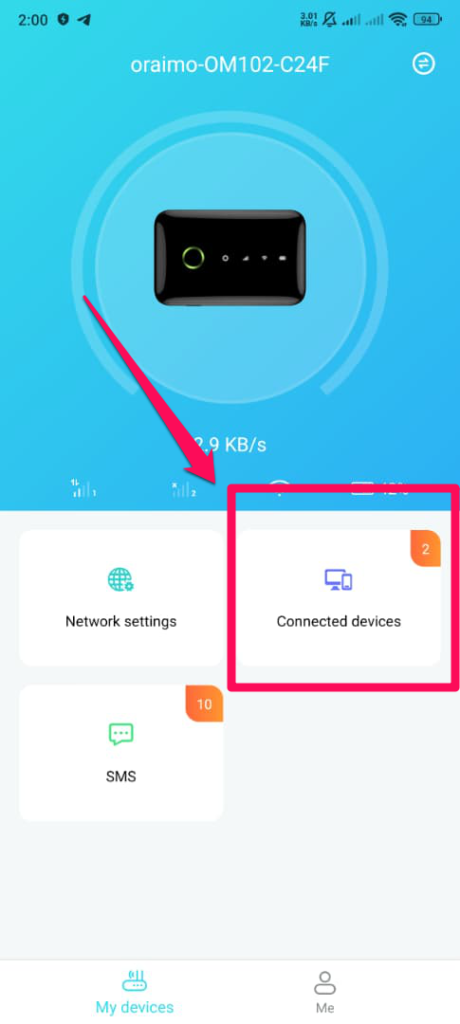
If you’re using a wireless internet device or even have your mobile hotspot on with more than 2 users connected. This will affect your data, and also know that each connected device uses data in the background, even when not actively in use.
4. Background Activity
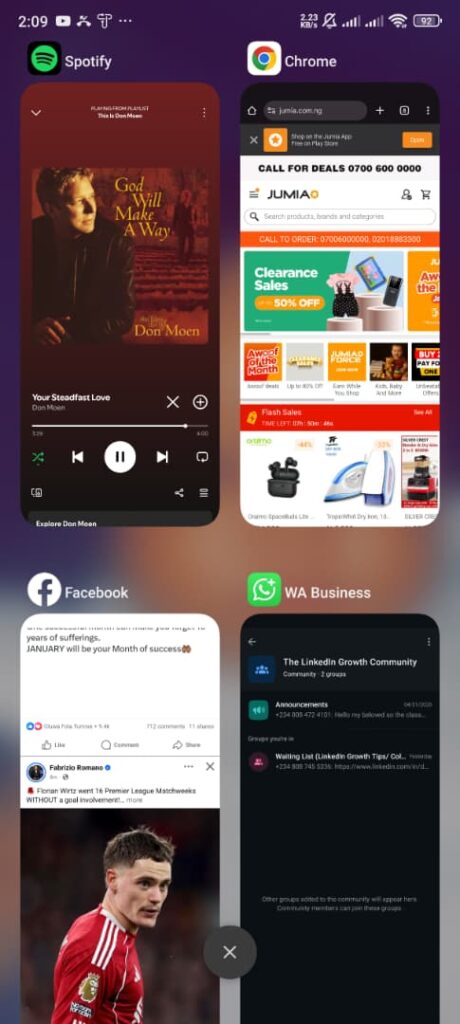
Apps on Android or iPhone will always continue to sync data, refresh feeds, and send updates even when you are not using them directly. The more apps you have running in the background, the more data you’ll waste.
5. Video Auto-Play
Platforms like Facebook, Instagram and TikTok have a video auto-play feature enabled by default. This consumes data even when you have no interest in watching a video.
6. Online Gaming
From PUBG Mobile to CODM, these online games constantly exchange data with servers to serve users in real-time. There are also bulky in-game updates, background downloads and other factors that consume data.
Understanding what causes data wastage helps you reduce unnecessary usage, but even with all these measures in place, internet data will still run out eventually. When that happens, having a fast and reliable way to top up becomes important. With AirtimeFlip, you can easily buy data for any major Nigerian network without stress, long queues, or failed transactions.
Common Ways to Avoid Data Wastage
Aside from known internet activities performed by you that led to more data consumption, here are a few ways to control your internet data.
1. Turn Off Unnecessary Background Data
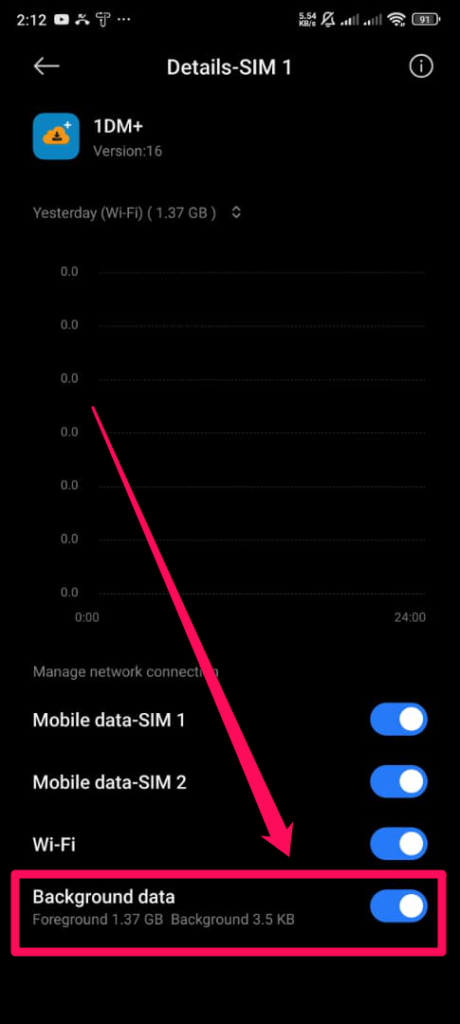
Not all apps need to constantly access the internet. Explore your device’s app management and manually turn off internet access for apps you’re not using. Only focus on essential apps and enable other apps when needed. To do this, go to your Settings > Data Usage > and then locate the app you want to turn its data access off.
2. Control App and System Updates
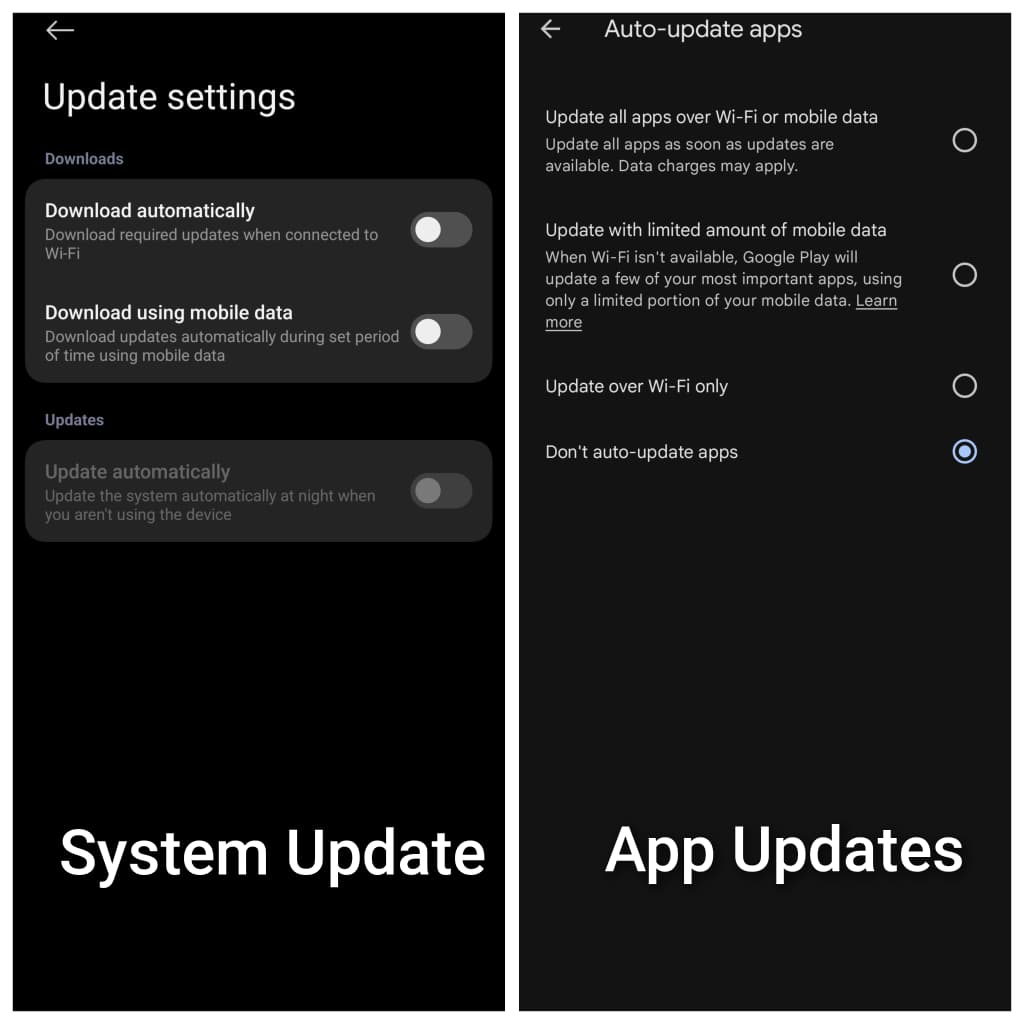
Whether it’s WiFi internet or mobile internet data, always turn off automatic downloads and prevent your device from downloading large files over WiFi or mobile internet unless you manually download.
3. Reduce Video Quality
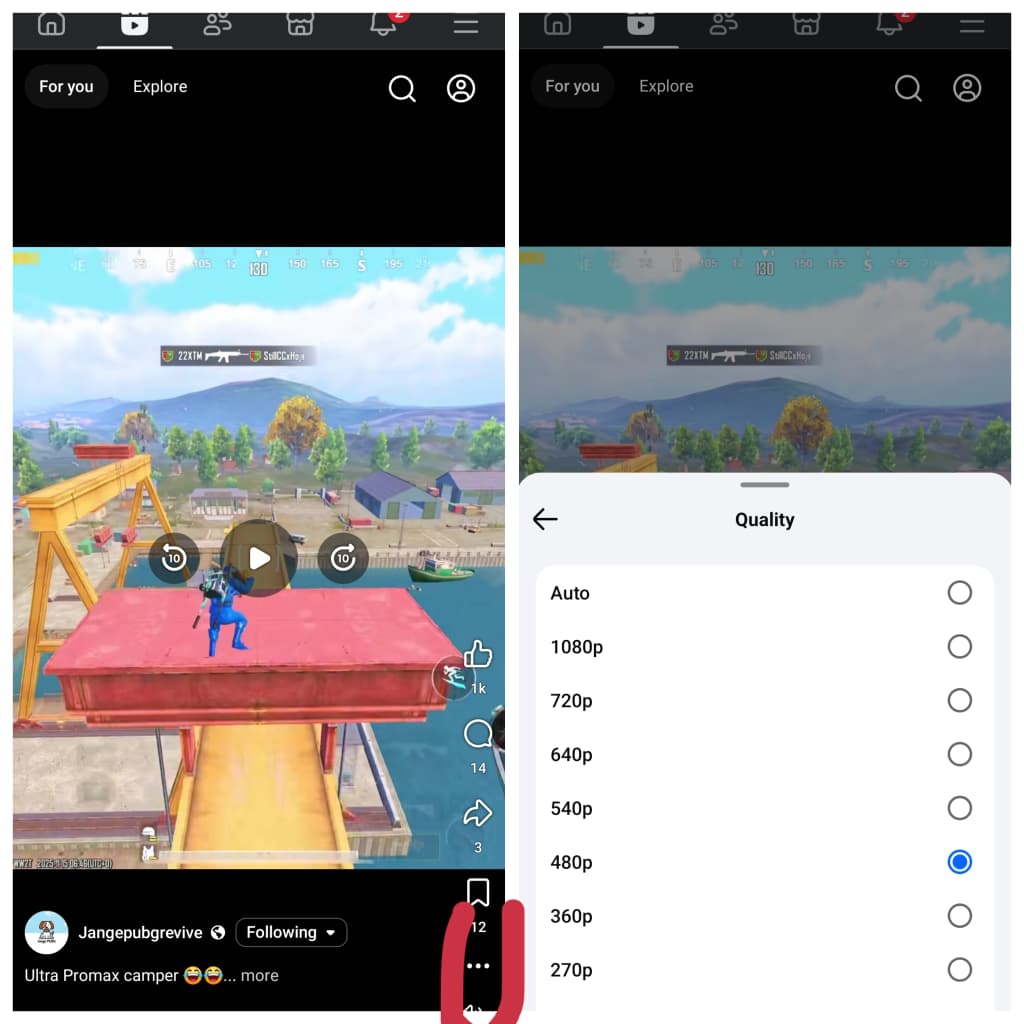
When streaming on YouTube, Facebook or any platform, always confirm video quality and if it’s higher than 480p, kindly reduce. The higher the quality, the more data that’ll be consumed.
4. Monitor Data Usage Regularly
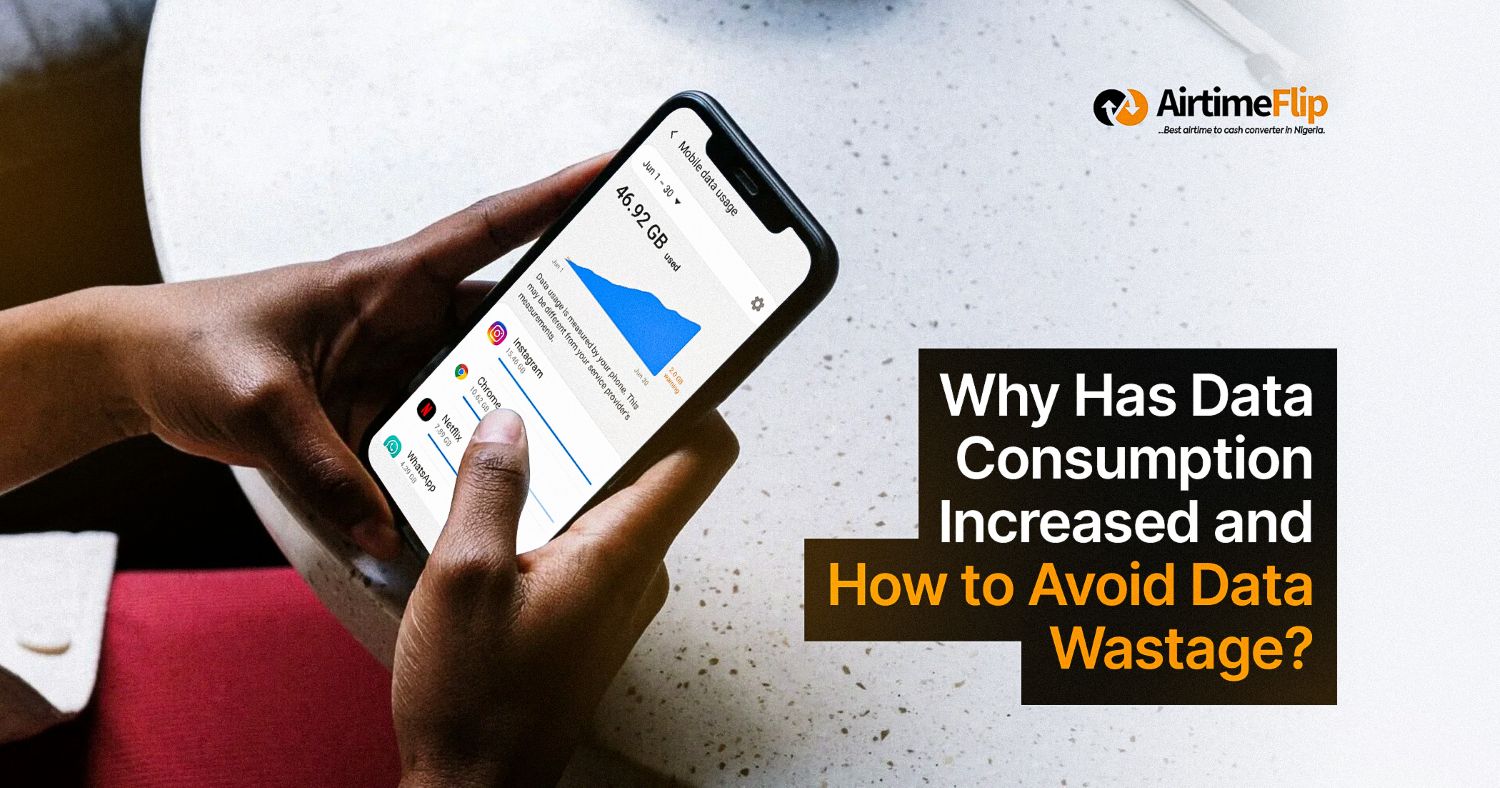
Using the built-in Data Usage checker on your device will help you identify which app consumes too much data. You can also explore the Google Play Store and App Store for apps that’ll record your daily, weekly, and monthly internet data usage for real-time updates.
FAQs
Why does my data finish even when I haven’t used it much?
- When you’re not actively using your internet data. It can still be used in the background by the following activities, like app syncing, system updates, location services, etc.
Do background apps consume data even when the phone seems idle?
- Yes, apps that require the internet to exchange data in the background might increase your data consumption.
Can automatic updates drain my data?
- Automatic updates, such as system updates and app updates, can drain internet data occasionally if not controlled.
Can ads in apps use up my data?
- Yes. Most free apps that load video ads can affect internet data consumption.
Could malware or viruses be using my data without me knowing?
- Sometimes apps with malware or viruses can stay active in the background and send or receive data without one’s notice.
Why does streaming video use so much data?
- When you stream videos, especially in high quality. They tend to consume more data due to the transfer of large amounts of data between the server and your device.
Conclusion
The increase in data consumption might sound very alarming, but nothing can be done aside from implementing proper management. Modern devices need constant internet access, streaming qualities are being improved, and the best experiences across apps and services are served better with internet data. You just need to understand what consumes your data and the best ways to control it.
What should you do when the data finishes unexpectedly?
While you can reduce data wastage by managing background activity and lowering streaming quality, running out of data is sometimes unavoidable. When it happens, the key is having a reliable way to get back online quickly. With AirtimeFlip, you can purchase data instantly, avoid failed transactions, and stay connected without stress.