


Ever wondered how people are able to stay connected using the same phone number even when they have moved out of their country of residence? If this question lingers in your heart and you are looking for an answer, then you are in the right place.
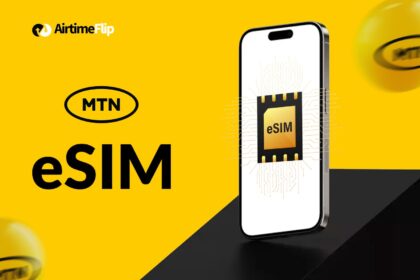
So about that, the answer is… eSIM!
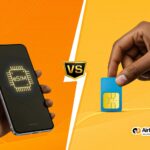
eSIMs have influenced the way people stay connected when they are on the move. Compared to a physical SIM, an eSIM can be purchased and activated in minutes and does not require buying from the telco store.
Airtimeflip now offers a way to acquire data-only eSIMs that work in over 100 countries. As soon as you activate it, your device can instantly connect to the local network in the country, enabling you to browse the internet wherever you go.
This guide provides a comprehensive overview of everything you need to know about the eSIM. You will learn how to activate eSIM using QR code or manual entry directly on AirtimeFlip, how it works on both Android and iPhone, and other important information you should know about using the eSIM.
Why AirtimeFlip eSIM is the Better Choice
When you put the eSIM side by side with the physical SIM, you will realise that it offers way more benefits in comparison. You can check out this post: eSIM vs. Physical SIM, and Which One Is Better? We broke down what you know about eSIM, how it works, and all its attributes (including key differences).
1. Instant and Easy Activation
eSIM technology offers a much easier and faster way to get connected. You can activate your SIM instantly without visiting a physical store, filling out boring forms, or standing in long and annoying queues. AirtimeFlip makes the process less complex by allowing you to buy and activate your eSIM directly within the app.
2. No Physical Damage or Loss
Another major advantage is that an eSIM cannot be damaged, misplaced, or stolen. Everything is stored digitally inside your device, so you never have to worry about a broken or missing SIM card ever again.
3. Great for Travel
eSIMs are the better option for travellers. You can switch between networks easily, activate international airtime and data plans whenever you need them, and stay online without searching for a local SIM.
4. Better Security
Security is also much stronger with eSIMs. If your phone gets lost or stolen, your SIM cannot be removed from the device. This reduces the risk of SIM-related fraud and keeps your number safer.
How to Activate Your AirtimeFlip eSIM by Scanning a QR Code
When you buy an eSIM on the AirtimeFlip website or through the mobile app (Play Store and App Store), you receive a special QR code linked to your plan. You can then follow the steps below to activate it.
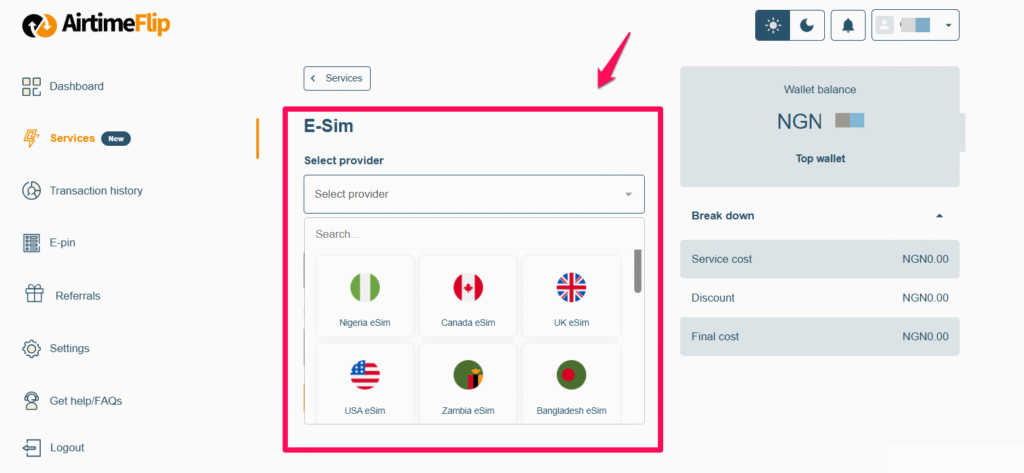
- After you have successfully purchased the eSIM, open the QR code that was sent to you via email or inside your AirtimeFlip dashboard.
- Next up, make sure you use an eSIM-compatible device to scan the QR code you received. We have further explained the processes involved in scanning and activating your code for iPhone and Android users, respectively.
- Once the scanning process is complete on the supported eSIM device, the eSIM will appear in your mobile data settings.
- Ensure that ‘Data Roaming’ is enabled so your phone can connect automatically when you arrive in your destination country.
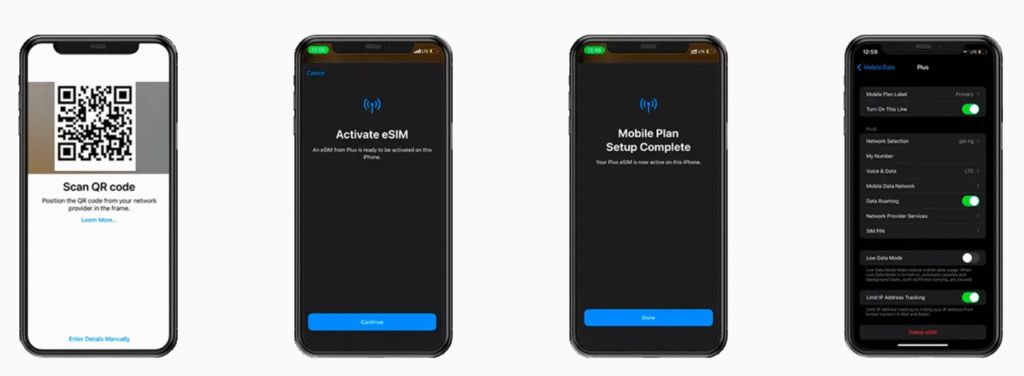
This method explained above works on all major eSIM-compatible smartphones and is the easiest way to get started via the AirtimeFlip platform.
How to Manually Activate an AirtimeFlip eSIM on iPhone
If you cannot scan your QR code, the guidelines for manually installing the eSIM are provided below.
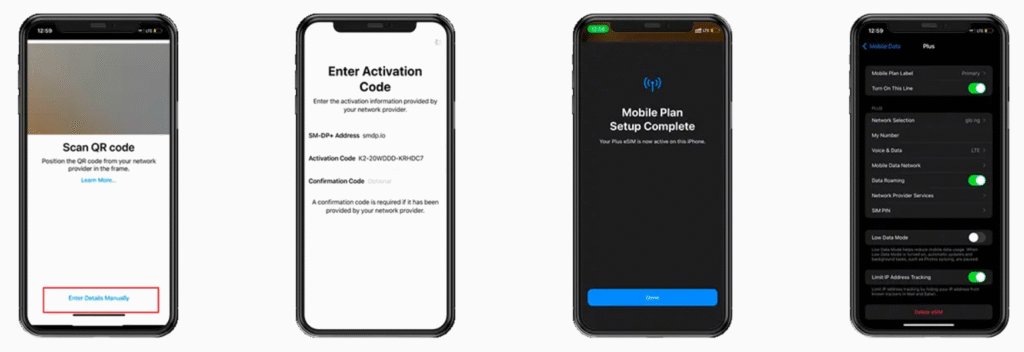
- Open Settings on your iPhone and navigate to Mobile Data.
- Tap Add eSIM > Choose Use QR Code > At the bottom of the screen, select Enter details manually.
- You will see three fields. Fill in the SM-DP+ Address and Activation Code exactly as provided in your purchase email. You can leave the third field, the ‘Confirmation Code’ field, empty, as it’s optional.
- Click ‘Next’ at the top of the screen and follow the on-screen instructions until installation is complete.
- As you arrive at your destination, turn on ‘Data Roaming’ to start using your plan immediately.
How to Manually Activate an AirtimeFlip eSIM on Android
Manually activating this on Android varies slightly compared to its iPhone counterpart; however, the activation steps are similar.
- Firstly, open your phone Settings and navigate to Connections.
- Select SIM card manager.
- Tap Add eSIM.
- Choose Scan QR code.
- Select Enter activation code, then enter the activation code from AirtimeFlip.
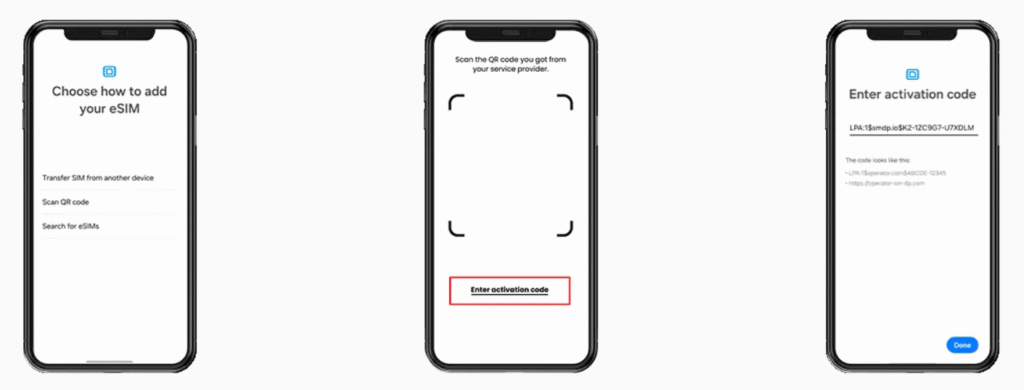
- Tap Done and continue with the installation instructions until your profile is added.
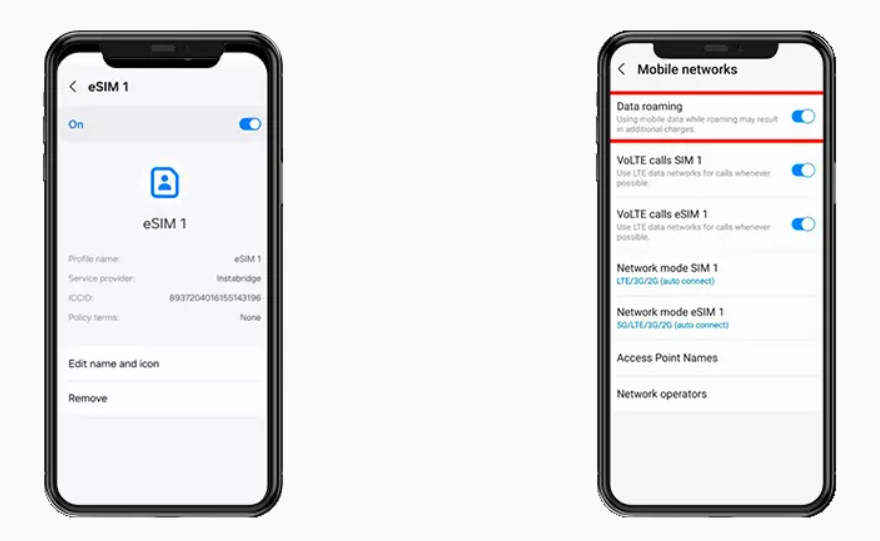
- Lastly, make sure the eSIM switch is turned on and enable ‘Data Roaming’ to allow the device to function in your destination country.
A Few Important Rules You Should Know
Before activating your eSIM, there are a few important rules and limitations to keep in mind.
- AirtimeFlip aims to provide smooth and uninterrupted service; however, network quality depends entirely on the local operators in each country.
- Your smart device must be unlocked and eSIM-compatible. Additionally, please note that you are responsible for verifying compatibility before purchasing an AirtimeFlip eSIM.
- Your eSIM must be activated within one year of purchase. Expired eSIMs are non-refundable.
- If you travel for extended periods, your roaming usage may be restricted by local operators.
- Any misuse of eSIM for illegal or harmful activities may result in termination and suspension.
- All payments are final. Customers cannot offset claims or request refunds after their account has been activated.
Click here to read more on the full Terms and Conditions before using AirtimeFlip eSIM.
Frequently Asked Questions
What is an AirtimeFlip eSIM, and how is it different from a regular SIM?
- It is a digital SIM that provides you with data access without the need for a physical card. Your device connects to supported local networks automatically when you travel.
Is my phone compatible?
- Your phone must support eSIM technology and be unlocked from its carrier. You can check your device settings or view AirtimeFlip’s list of eSIM-compatible devices.
Can I use the eSIM while travelling abroad?
- Yes. AirtimeFlip eSIMs are designed for international travel, allowing you to connect to local networks at competitive rates.
Can I move my eSIM to another device?
- No. Each QR code can only be used once; hence, you need to purchase a new eSIM to use it on another device.
Are there extra costs?
- No. You only pay for the plan you choose. Once your data finishes, you will need a new package.
Can I keep more than one eSIM on my device?
- Yes. Many smart devices allow multiple eSIM profiles, but you can only use one plan at a time, depending on the smartphone model.
Can I delete my eSIM?
- Yes. You can easily remove or deactivate it from your device settings, but deleted eSIMs cannot be restored; you will need a new package.
Can I activate my eSIM before travelling?
- Yes. In fact, it is recommended. This ensures your data starts working as soon as you arrive in the destination country.
Final Thoughts
AirtimeFlip’s eSIM service offers you a simple, affordable and reliable way to stay connected abroad. Whether you activate using a QR code or enter your details manually, the entire process takes just a few minutes. Once you have activated and installed the eSIM, your device automatically connects to strong local networks in your destination country.
If you want to avoid paying expensive roaming charges or the stress of buying physical SIM cards abroad, an AirtimeFlip eSIM is one of the best solutions available today.